 اللغة العربية
  Español
  Français
  Pусский
  简体中文
简体中文 
.webp "FS-FHSS Wireless Simultaneous Interpretation System")
.webp "IR Simultaneous Interpretation System")
.webp "Interpreter Console")
Government and council meetings require more structure than an ordinary business discussion. A meeting may move from one agenda item to another, different representatives need to speak in an orderly way, and formal decisions may need to be recorded through voting. When these processes are handled separately, operators have more opportunities to miss a step or lose track of what is happening in the room.
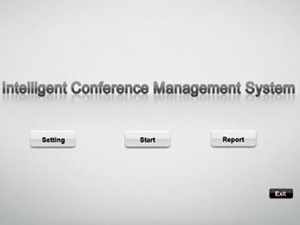
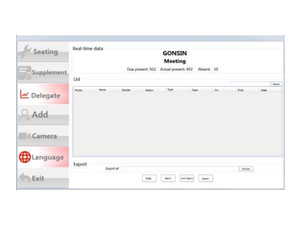
A well-designed conference management software system brings the meeting process into one control environment. Instead of treating microphones, voting and room displays as unrelated functions, the software helps operators follow the meeting as it develops and coordinate the technology around it.
For government agencies, councils and other formal meeting venues, the important question is therefore not simply how many features the software has. The better question is whether it matches the rules of the meeting, works reliably with the room equipment and remains manageable when the session becomes busy.
What Makes Government Meetings Different from Regular Business Meetings?
Most business meetings are relatively flexible. Participants can interrupt, change topics or postpone a decision without creating a serious operational problem. Formal government meetings usually need a clearer sequence. The chairman or operator must know which item is being discussed, who has the right to speak and when the meeting is ready to move to a decision.
This makes the relationship between the software and the meeting procedure especially important. Technology should support the established process rather than force participants to change the way the meeting is conducted.
For example, a council may need to prepare an agenda before the session and connect each topic with the relevant discussion or vote. During the meeting, the operator should be able to follow that sequence without repeatedly switching between unrelated programs. Once the session ends, the information generated during the meeting should remain organized enough for later review.
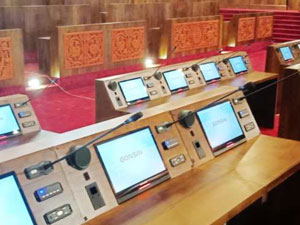
The scale of the room can make this more challenging. In a small committee room, the chairman may easily see who wants to speak. In a large council chamber with many representatives, software-assisted control becomes far more useful because the operator needs a clear view of the meeting status without relying entirely on visual observation.
How Should Speaker Management Work During a Formal Meeting?
Speaker management is one of the areas where software can directly influence how smoothly a formal meeting runs. The objective is not simply to turn microphones on and off. The system should help the chairman and operator maintain an understandable speaking order while allowing the discussion to continue naturally.
In a structured meeting, participants may request to speak rather than opening their microphones whenever they choose. The chairman can then recognize the appropriate speaker according to the meeting rules. The software interface should make this process easy to understand at a glance, particularly when several participants are waiting.
The microphone system and management software should work as one workflow. When the operator has to control the discussion from one interface and the microphones from another unrelated system, even a simple change can become unnecessarily complicated.
This coordination also matters when the meeting uses automatic camera tracking. Once a recognized participant begins speaking, the AV system can use the microphone position as part of the camera control workflow. The result is a more coherent experience for people in the chamber as well as viewers watching a recording or live feed.
However, automation should not remove operator control. Formal meetings can change direction unexpectedly, so the chairman or technician should still be able to intervene when the normal speaking sequence no longer applies.
How Can Voting Be Integrated into the Meeting Process?
Voting works best when it is treated as part of the agenda rather than as an isolated technical function. The transition from discussion to decision should be clear to the operator and participants, and the voting method should fit the procedural requirements of the organization.
A practical workflow begins before anyone presses a voting button. The relevant proposal or agenda item is prepared in advance, and the operator confirms that the meeting is ready to vote. The voting session can then be opened, completed and closed without breaking the flow of the meeting.
The result should also be presented in a way that fits the room. Some councils may need the outcome shown immediately on a main display, while others may prefer the information to remain primarily within the management interface. What matters is that the result is connected to the correct meeting item and can be reviewed afterward.
| Meeting Stage | What the Operator Needs | Role of the Management System |
|---|---|---|
| Before discussion | A clear agenda and prepared meeting information | Organizes the topic before the session begins |
| During discussion | Control over the active speaker and meeting progress | Connects the current topic with speaker control |
| During voting | A controlled start and end to the decision process | Runs voting within the current meeting workflow |
| After the decision | A result that can be displayed and reviewed | Keeps the voting outcome associated with the meeting record |
This continuity is particularly useful in meetings with several agenda items. Rather than treating every vote as a separate task, the conference management software system helps keep decisions connected to the discussion that led to them.
Why Does Conference Software Need to Work with the Room’s AV System?
Conference management software becomes far more useful when it understands what is happening in the physical meeting room. Government chambers are not operated through software alone. Participants interact through microphones, cameras capture the active speaker and large displays may present information to everyone in the room.
If these systems are planned independently, the operator may need to repeat the same action several times. Recognizing a speaker in the management software, selecting the corresponding microphone and changing the camera shot manually creates unnecessary work during a live meeting.
A coordinated system reduces this fragmentation. The software becomes the operational layer that connects the meeting procedure with the AV equipment, while the individual devices continue to perform their specialized roles.
This does not mean every function should be automated. A reliable design gives operators a straightforward default workflow but still allows manual control when the meeting requires it. That balance is especially important in government environments, where a small operational problem can interrupt a highly visible session.
GONSIN develops conference management, discussion, voting and related AV solutions that can be planned as part of the same meeting environment. Buyers considering a wider system upgrade can explore GONSIN conference system products when comparing the software with the equipment that will operate around it.
What Should Buyers Check Before Choosing a Conference Management System?
The best system is not necessarily the one with the longest feature list. Buyers should begin with the way their meetings are actually conducted. A municipal council with fixed delegate seats may have very different requirements from a multi-purpose government conference center where room layouts and participants change frequently.
The software should first be tested against a normal meeting from beginning to end. Can the operator prepare the session without unnecessary steps? Is it easy to see who is speaking? Does voting follow naturally from the current agenda item? Can the system recover quickly if the operator needs to change the planned sequence?
Hardware compatibility deserves the same attention. Existing microphones, voting terminals, cameras and display systems may represent a significant investment, so the management platform should be evaluated as part of the complete room rather than as an isolated software purchase.
Reliability should also be assessed at workflow level. A technically powerful platform is of limited value if routine operations are too complicated for the staff who use it every day. Interfaces should make common tasks obvious while protecting deeper system settings from accidental changes.
For larger government projects, it is useful to evaluate the system in a real or simulated meeting before final deployment. This reveals practical issues that are difficult to identify from a specification sheet alone, especially when several people speak, an agenda changes unexpectedly or voting begins immediately after a discussion.
GONSIN has supplied conference solutions for government and council environments, and its conference management software is designed to work within a broader conference system rather than as a standalone scheduling application. Organizations planning a new chamber or upgrading an existing meeting room can contact GONSIN to discuss the meeting workflow, room setup and required system integration.
Conclusion
Choosing a conference management software system for a government or council meeting is ultimately about controlling the meeting process, not simply adding more technology to the room.
The software should help the chairman and operator move naturally from discussion to decision while keeping microphones, voting and AV operation aligned with that process. When these elements work together, the technology becomes less visible and the meeting itself becomes easier to manage.
Before making a final selection, buyers should test how the system behaves during a realistic meeting. A platform that follows the organization’s actual procedures, integrates reliably with the room equipment and remains simple under pressure is more valuable than one that offers many functions that are rarely used.
Frequently Asked Questions About Conference Management Software
1. What is a conference management software system?
It is a platform used to organize and control the workflow of a conference, including meeting preparation, speaker management, voting and related room operations.
2. Is conference management software suitable for council chambers?
Yes. It is particularly useful where meetings follow structured agendas and require controlled speaking and voting procedures.
3. Can conference management software work with camera tracking?
It can when the conference system and camera control equipment support compatible integration and speaker-position information.
4. Should government buyers choose software and conference hardware separately?
They can be procured separately, but compatibility should be checked as a complete system before deployment to avoid fragmented operation.