 اللغة العربية
  Español
  Français
  Pусский
  简体中文
简体中文 
.webp "FS-FHSS Wireless Simultaneous Interpretation System")
.webp "IR Simultaneous Interpretation System")
.webp "Interpreter Console")
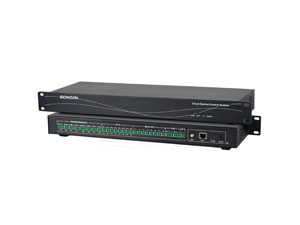
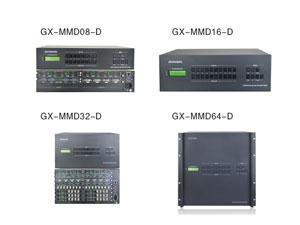
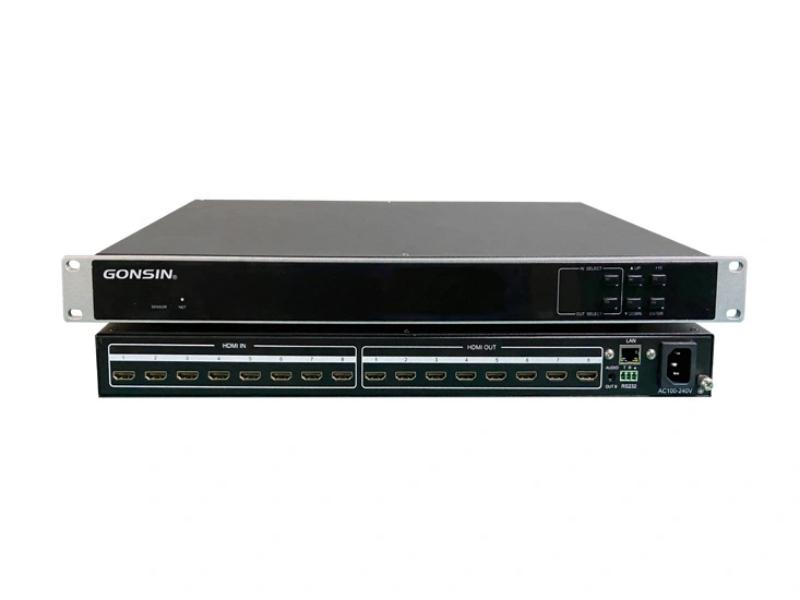
An HDMI matrix sits at the center of video routing in many professional conference rooms. It allows different sources to be sent to different displays without reconnecting cables whenever the meeting format changes. In a simple room, that may mean switching between a presentation computer and a conferencing source. In a larger venue, several displays may need to show different content at the same time.
The challenge is that an HDMI matrix that looks suitable on paper may not fit the way the room actually operates. Port count is only the beginning. Switching behavior, signal compatibility, future expansion and control integration all affect how smoothly the system performs during a live meeting.
For integrators comparing a China HDMI matrix for a professional AV project, the better approach is to begin with the room workflow rather than the product specification sheet. Once the signal path is clear, it becomes much easier to decide what type of matrix the project really needs.
Start with the Number of Sources and Displays
Matrix sizing begins with a simple question: what needs to enter the system, and where does each signal need to go?
Suppose a conference room uses several presentation sources but only one main display. That room does not have the same routing requirement as a venue where the main screen, confidence monitor and secondary display must be able to show different content independently. The number of devices matters, but the relationship between them matters more.
This is why input and output requirements should be mapped before the matrix is selected. Each source that may need independent access to the system requires an input path, while each display that may need a separately controlled image requires an appropriate output.
It is also worth considering how the room may change. A matrix selected with no remaining capacity can become restrictive when another conferencing source or display is added later. At the same time, buying a much larger system simply because expansion is theoretically possible can add unnecessary cost and complexity.
The right balance is to understand the current routing requirement first, then leave reasonable room for changes that are genuinely likely during the life of the conference system.
Why Seamless Switching Matters in a Conference Room
Video switching is most noticeable when it goes wrong. A presenter changes from a laptop to a remote participant, and the main display briefly turns black. A few seconds later another source is selected and the image flashes again. The meeting can continue, but the room no longer feels professionally controlled.
Seamless switching is designed to reduce this interruption by maintaining a stable output while the source changes. This is particularly valuable in executive meetings, government sessions and presentation-heavy rooms where several sources may be used during the same event.
The benefit is not simply faster switching. The audience should experience a clean transition without having to think about what the AV system is doing behind the scenes. That becomes increasingly important when video output is also being recorded, streamed or shown on large displays.
Resolution handling can affect the transition as well. Conference sources are not always identical. One laptop may output a different format from another source, so the matrix and the wider display chain need to handle those changes predictably.
When evaluating a China HDMI matrix, it is therefore worth seeing the switching process in operation rather than relying only on a specification stating that switching is supported. A realistic test using the sources and displays intended for the project gives a much clearer picture of actual performance.
Fixed HDMI Matrix vs Modular Matrix
Once the routing requirement is clear, the next decision is whether the room needs a fixed HDMI matrix or a modular video matrix.
A fixed matrix is usually the more straightforward choice when the project primarily uses HDMI and the required input and output capacity is already known. The architecture is simple, installation is easier to define, and there is little reason to add modular complexity if the signal environment is unlikely to change.
A modular matrix solves a different problem. It becomes useful when a project must accommodate different signal formats or when the AV infrastructure is expected to expand over time. Instead of replacing the entire matrix when the routing requirement changes, the system can be configured around the signal cards required by the project.
| Project Situation | Fixed HDMI Matrix | Modular Matrix |
|---|---|---|
| HDMI is the main signal format and routing needs are stable | Usually the simpler choice | May add flexibility that the project does not need |
| Different signal formats need to share one routing platform | May require additional conversion equipment | Better suited to mixed-signal architecture |
| The project is likely to expand | Expansion depends on the original port capacity | Provides a more flexible path for future changes |
| Installation simplicity is the priority | More direct to specify and deploy | Requires more careful system planning |
Neither architecture is automatically better. A small boardroom does not become more professional simply because it uses a modular chassis, while a complex conference center can become difficult to expand if it is built around a fixed matrix with no room for change.
The correct choice depends on how predictable the signal environment is. GONSIN offers both fixed HDMI matrix products and modular video matrix solutions, allowing the routing architecture to be selected around the project rather than forcing every room into the same design. Users planning a broader conference AV system can review the available GONSIN products when considering how matrix switching fits into the complete solution.
Signal Compatibility and AV System Integration
A conference matrix rarely operates alone. It sits between the sources that create the image and the displays that present it, while a control system may determine when and where each signal is routed.
This means compatibility needs to be considered across the entire signal path. A matrix may accept a source correctly but still produce an unstable result if the display expects a different format or if source identification is not handled consistently. EDID management, for example, helps HDMI devices establish the video format that should be transmitted between them.
Integration becomes more important when the room is centrally controlled. Instead of asking an operator to use the front-panel buttons every time the display source changes, the matrix can become part of a wider control workflow. A meeting-room preset might route the presentation source to the main display, while another operating mode changes the video path for a remote conference.
The same principle applies to larger installations. A government meeting room or conference center may need video routing to work alongside cameras and other AV systems. In these projects, matrix selection should be made with the complete control architecture in mind rather than after the rest of the room has already been designed.
For this reason, compatibility is not simply a matter of asking whether the unit has an HDMI connector. The more useful question is whether the matrix can maintain a predictable signal path between the actual devices used in the project.
What Should You Verify Before Choosing an HDMI Matrix Supplier?
Once the technical architecture has been defined, supplier evaluation becomes much easier. Buyers no longer need to compare products based only on port count or price because they know what the matrix must accomplish in the finished room.
The first thing to verify is whether the supplier can recommend a configuration based on a real signal diagram. A supplier that understands professional AV integration should be able to discuss what the sources are, where the outputs go and how the system will be controlled before recommending a model.
Product claims should also be tested against the intended application. If seamless switching is important, ask to see how the equipment behaves when changing between the types of sources the room will actually use. If expansion is important, confirm how the proposed architecture can grow without requiring unnecessary replacement.
Support after delivery also matters in B2B projects. A matrix is often commissioned as part of a larger room, so installation questions may involve more than the device itself. When sourcing a China HDMI matrix, working with a supplier that understands conference AV systems can make troubleshooting and system integration more efficient than purchasing an isolated switching device without project-level support.
GONSIN develops video matrix equipment as part of its wider conference AV portfolio, including fixed and modular routing solutions for different project scales. If you are planning a new conference room or reviewing an existing video routing architecture, contact GONSIN to discuss the sources, displays and control requirements of your project.
Conclusion
Choosing an HDMI matrix for a professional conference room begins with understanding how video needs to move through the space. Port count provides the basic capacity, but it does not determine whether the system will switch cleanly, integrate with the existing AV environment or remain suitable when the room changes.
A fixed HDMI matrix is often sufficient when the routing requirement is stable and HDMI is the primary signal format. A modular matrix becomes more valuable when signal types or project scale are likely to change. In both cases, seamless switching and system compatibility should be verified in the context of the actual installation.
For buyers comparing a China HDMI matrix, the strongest purchasing decision is therefore based on the complete AV workflow rather than the matrix specification alone. A well-matched system should make source changes almost invisible to the audience while giving operators reliable control throughout the meeting.
Frequently Asked Questions About HDMI Matrix Systems
1. What is an HDMI matrix used for in a conference room?
It routes multiple HDMI sources to multiple displays and allows each output to select the required source independently.
2. What is the difference between an HDMI switcher and an HDMI matrix?
A basic switcher selects sources for a limited output path, while a matrix provides more flexible routing between multiple inputs and outputs.
3. When should I choose a modular matrix instead of a fixed HDMI matrix?
A modular matrix is more suitable when the project needs mixed signal formats, greater scalability or more flexibility for future changes.
4. Why is seamless switching important?
It reduces visible interruptions such as black screens or flashing when changing sources, creating a smoother presentation experience.